TL;DR: A professional live stream combines technical reliability (stable internet, clean audio, and consistent video quality) with intentional preparation (a clear run sheet, tested equipment, and defined roles). Polish comes from small details — smooth transitions, branded visuals, and a confident host — that together build audience trust from the opening seconds to the final sign-off.
Anyone can hit “Go Live.” Far fewer people can hold an audience’s attention for an hour without a dropped connection, an awkward silence, or audio that sounds like it’s coming from inside a tin can. The difference between an amateur broadcast and a professional one rarely comes down to budget. It comes down to preparation, consistency, and attention to detail.
Whether you’re streaming a product launch, a gaming session, or a corporate town hall, viewers form an opinion about your production quality within the first 30 seconds. If the stream looks shaky or sounds muffled, they leave. If it feels polished and intentional, they stay — and they trust the content more as a result.
This post breaks down exactly what separates professional-grade live streams from the rest, covering everything from pre-production planning to the equipment choices and on-screen habits that keep viewers engaged.
Why Does Pre-Production Planning Matter So Much for Live Streaming?
Professional streams rarely happen by accident. Behind every smooth broadcast is a plan that accounts for timing, content, and contingencies.
Build a Run Sheet Before You Go Live
A run sheet (sometimes called a rundown) is a minute-by-minute outline of what happens during the stream. It typically includes:
- Segment names and approximate timing
- Who is speaking or appearing on screen
- Any visual cues, graphics, or video clips that need to be triggered
- Transition points between segments
Having this document prevents dead air, keeps hosts on track, and gives everyone involved — from the camera operator to the moderator — a shared sense of what’s coming next.
Test Everything, Then Test It Again
Technical failures are the fastest way to break a professional illusion. Before any stream, confirm:
- Internet upload speed is sufficient for your chosen resolution and bitrate
- Microphones are capturing clean audio without background hum or clipping
- Cameras are properly framed, focused, and white-balanced
- Backup equipment (a second mic, a second internet connection, a backup laptop) is ready to go
A short technical rehearsal, even 15 minutes before going live, catches most problems before they become visible to an audience.
What Equipment Separates an Amateur Stream From a Professional One?
You don’t need a television studio to look credible, but a few equipment upgrades make an outsized difference.
Audio Quality Matters More Than Video Quality
Viewers tolerate average video far more than they tolerate poor audio. A dedicated USB or XLR microphone, positioned close to the speaker’s mouth, instantly elevates a stream’s perceived professionalism. Built-in laptop or webcam microphones tend to pick up room echo and background noise, which signals “amateur” faster than almost anything else.
Lighting Shapes How Credible You Look
Good lighting doesn’t require expensive gear. A single key light positioned in front of and slightly above the subject, paired with a softer fill light to reduce harsh shadows, creates a clean, professional look. Avoid relying solely on overhead room lighting, which tends to create unflattering shadows under the eyes.
Stable Internet Beats a Fancy Camera
A high-end camera means nothing if the stream buffers every few minutes. Where possible, use a wired ethernet connection instead of Wi-Fi, and consider a backup internet source (like a mobile hotspot) as insurance against outages.
How Do You Keep an Audience Engaged During a Live Stream?
Technical quality gets viewers to stay for the first minute. Engagement is what keeps them there for the full broadcast.
Define Roles Before the Stream Starts
Professional streams rarely rely on one person doing everything. Common roles include:
- Host: Leads the conversation and keeps energy up
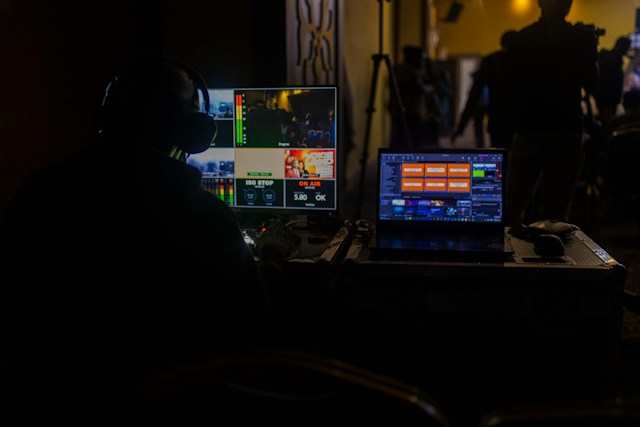
- Producer: Manages timing, cues, and technical troubleshooting behind the scenes
- Moderator: Monitors chat, surfaces audience questions, and flags issues in real time
Splitting these responsibilities means the host can focus entirely on the audience instead of worrying about whether the stream is still running.
Use Visual Branding Consistently
Branded overlays, lower thirds (the text banners that identify speakers), and consistent color schemes signal that a stream is produced with intention. These elements don’t need to be elaborate, but they should be consistent from the opening screen to the closing credits.
Talk to the Chat, Not Just the Camera
Live streaming is a two-way medium. Hosts who read out viewer questions, respond to comments by name, or acknowledge new followers create a sense of community that pre-recorded video can’t replicate. This interaction is often what separates a “watchable” stream from a “memorable” one.
What Should Happen in the First and Last Minutes of a Stream?
The Opening Sets the Tone
The first 30 to 60 seconds should confirm — quickly — that viewers are in the right place and that the production is in capable hands. This typically means:
- A brief, energetic welcome
- A quick overview of what’s coming up
- Confirmation that audio and video are working properly
Avoid long technical delays or awkward “can everyone hear me?” moments once the stream is live. Save that troubleshooting for the pre-show check.
The Close Should Feel Intentional, Not Abrupt
Professional streams don’t just end when the content runs out. A strong closing includes a summary of key points, a clear call to action (subscribe, visit a link, join the next session), and a proper sign-off rather than an abrupt cut to black.
Why Does Consistency Matter More Than Perfection?
Perfection isn’t the goal of professional live streaming — reliability is. Audiences return to streams and channels that consistently deliver the same quality of audio, visual style, and pacing, even if individual elements aren’t flawless. A stream that’s 90% polished every single week builds more trust than one that’s perfect once a month and rough the rest of the time.
This is why many professional streamers invest in templates, standardized equipment setups, and repeatable checklists. Consistency removes guesswork and reduces the chance of last-minute surprises.
Bringing It All Together
A professional live stream with dmp.sg is the result of dozens of small decisions made before the camera ever turns on: a tested internet connection, a clear run sheet, a well-placed microphone, and a plan for how the broadcast opens and closes. None of these elements are flashy on their own, but together they create the seamless experience that keeps viewers watching.
If you’re planning your next broadcast, start by auditing your current setup against the basics covered here — audio clarity, lighting, a run sheet, and defined roles. Small, consistent improvements in each of these areas will do more for your stream’s credibility than any single piece of expensive equipment.
Frequently Asked Questions
How much does it cost to start a professional-looking live stream?
A solid entry-level setup — a USB microphone, a basic ring or softbox light, and a reliable webcam — can cost a few hundred dollars. Professional quality depends more on correct setup and lighting than on expensive gear.
What internet speed is needed for a smooth live stream?
Most platforms recommend a minimum upload speed of 5–10 Mbps for standard HD streaming, though higher resolutions and multi-camera setups require more bandwidth. A wired connection is generally more stable than Wi-Fi.
Do I need a producer or moderator for a small live stream?
Not necessarily, but even an informal second person to manage chat and flag technical issues can significantly reduce stress on the host and improve the viewer experience.
How long should a live stream be to keep people engaged?
There’s no universal rule, but many professional streams run between 30 and 90 minutes, with clear segments to maintain pacing. Shorter streams suit quick updates, while longer formats work for in-depth discussions or events.
What’s the biggest mistake beginners make when live streaming?
Underestimating audio quality. Viewers are far more forgiving of imperfect video than they are of muffled, echoey, or inconsistent sound.